
Sub-Total: $0.00
Post
How Do You Report a Broken Tesla Supercharger in the Tesla App?
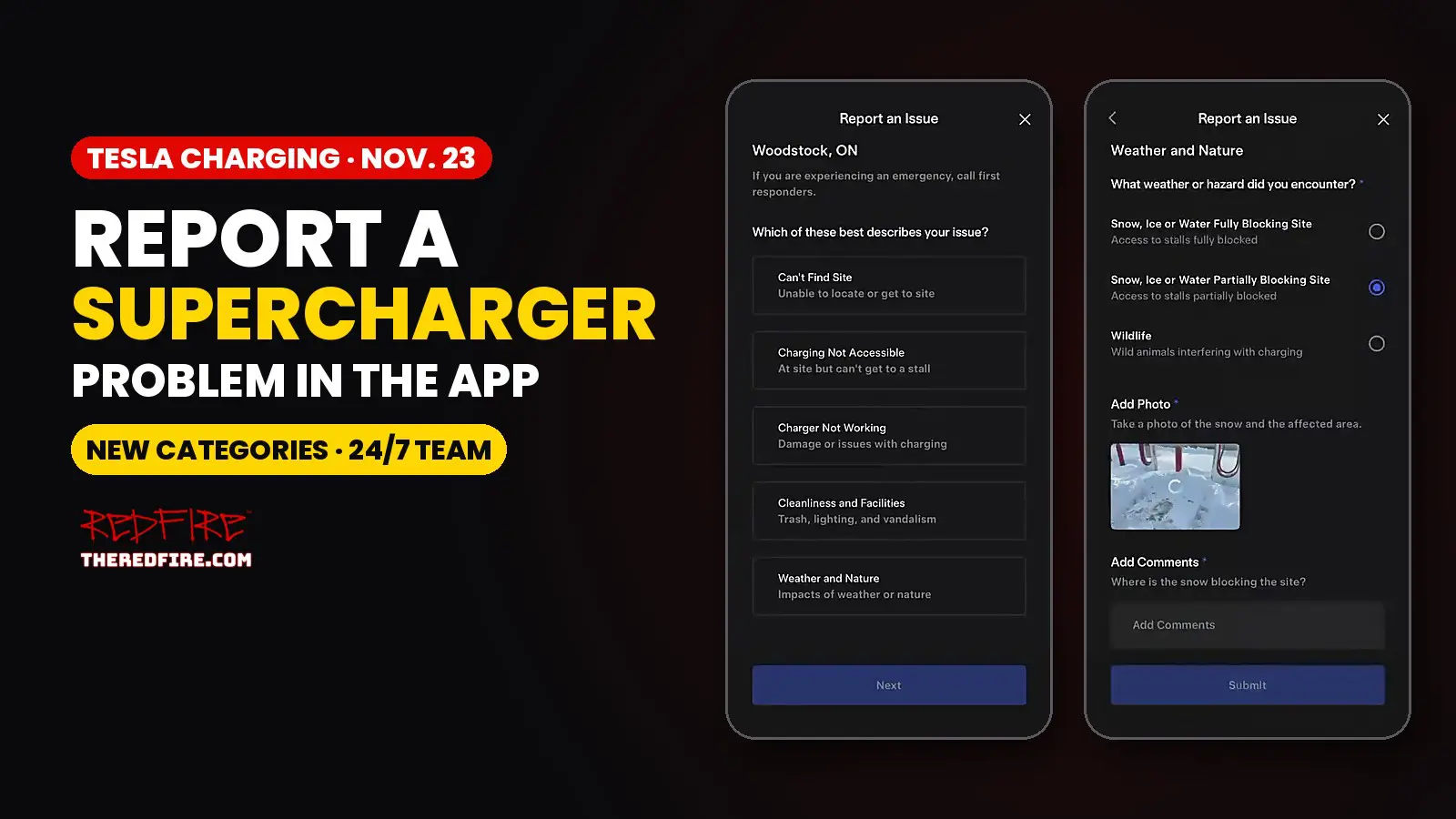
Open the charging site in the Tesla app and tap Report an Issue. Tesla Charging, the company’s official charging account on X, said Monday evening, Nov. 23, 2026, that the tool now has additional categories and that reports go to Tesla’s 24/7 Operations team, which it said helps the company fix problems faster. The feature covers Superchargers, Megachargers and Destination Chargers, Tesla said.
Spotted an issue at a Supercharger, Megacharger, or Destination Charger? Use Report an Issue in the Tesla app, now with additional categories. Reports go to our 24/7 Operations team, helping us fix them faster.
— Tesla Charging (@TeslaCharging) November 23, 2026
“Spotted an issue at a Supercharger, Megacharger, or Destination Charger? Use Report an Issue in the Tesla app, now with additional categories,” Tesla Charging wrote at 7:14 p.m. ET. “Reports go to our 24/7 Operations team, helping us fix them faster.” The post did not say which app version adds the new categories, which categories are new, or whether every owner has them yet.
Three minutes later, Max de Zegher, Tesla’s senior director of charging, quoted the post. “Every report goes straight to the most relevant people, the ones who can fix it the fastest,” he wrote. “Direct line of communication. Live feedback loop, 24/7.” His X bio reads “Building Superchargers since 2014.”
What categories does the Tesla app show?
Tesla Charging’s 17-second video walks through a report at the Supercharger in Woodstock, Ontario. After Report an Issue is tapped on the site’s card, the app asks, “Which of these best describes your issue?” It lists five choices, each with a short description on screen:
- Can’t Find Site: “Unable to locate or get to site”
- Charging Not Accessible: “At site but can’t get to a stall”
- Charger Not Working: “Damage or issues with charging”
- Cleanliness and Facilities: “Trash, lighting, and vandalism”
- Weather and Nature: “Impacts of weather or nature”
The same screen tells drivers, “If you are experiencing an emergency, call first responders.”
In the video, choosing Weather and Nature opens a second question, “What weather or hazard did you encounter?” The options are Snow, Ice or Water Fully Blocking Site; Snow, Ice or Water Partially Blocking Site; and Wildlife, described as “Wild animals interfering with charging.” The video does not show what the other four categories open.
How to file a report, step by step
The steps below follow Tesla Charging’s video and an earlier Tesla Charging post that gave the path as “Tesla App → Location → Select the site → Report an Issue.”
- Open the Tesla app, go to Location and select the charging site.
- Tap Report an Issue on the site’s card.
- Pick the category that best describes the problem and tap Next.
- Choose the specific issue. In Tesla’s example, that was Snow, Ice or Water Partially Blocking Site.
- Add a photo with Take a Photo or Choose a Photo.
- Add a comment, such as which stalls are affected, and tap Submit.
In the snow example, the photo and comment fields were marked as required once an option was picked. The app prompted, “Take a photo of the snow and the affected area” and “Where is the snow blocking the site?” Tesla’s demo typed “1A to 2B blocked by snow.” After Submit, the site card showed an “Issue Reported” confirmation.
Why it matters during Thanksgiving week
The update lands during Thanksgiving travel week. Redfire reported Monday that Tesla Charging posted 15 new U.S. Supercharger sites in the week before Thanksgiving. Tesla has not said how quickly crews respond to a report, and Tesla Charging’s post did not promise a repair time.
Redfire’s view: the comment box is the part owners should use. A photo plus stall numbers, as in Tesla’s “1A to 2B” example, tells a repair crew exactly where to look. For anything dangerous, Tesla’s own screen says to call first responders first.
FAQ
Where is Report an Issue in the Tesla app?
Open the Tesla app, go to Location and select the charging site. Report an Issue is on the site’s card, below the busy times and price per kWh in Tesla’s video.
What categories can you choose when reporting a Supercharger problem?
Tesla Charging’s Nov. 23 video shows five: Can’t Find Site, Charging Not Accessible, Charger Not Working, Cleanliness and Facilities, and Weather and Nature.
Who reviews Tesla charging reports?
Tesla Charging says reports go to its 24/7 Operations team. Tesla has not said how quickly a report is fixed.
Sources
- Tesla Charging on X, Monday, Nov. 23, 2026, 7:14 p.m. ET (post and 17-second video)
- Max de Zegher on X, Monday, Nov. 23, 2026, 7:17 p.m. ET
- Tesla Charging on X, Feb. 21, 2025, 3:56 p.m. ET (Report an Issue path)
- Business Insider, Oct. 2026 (de Zegher title)
- Redfire, Did Tesla Open New Superchargers Ahead of Thanksgiving Travel?, Nov. 23, 2026